WordCraftWord processing in your browser
Word processingA fast, open-source word processor, rebuilt in pure Rust.
About WordCraft
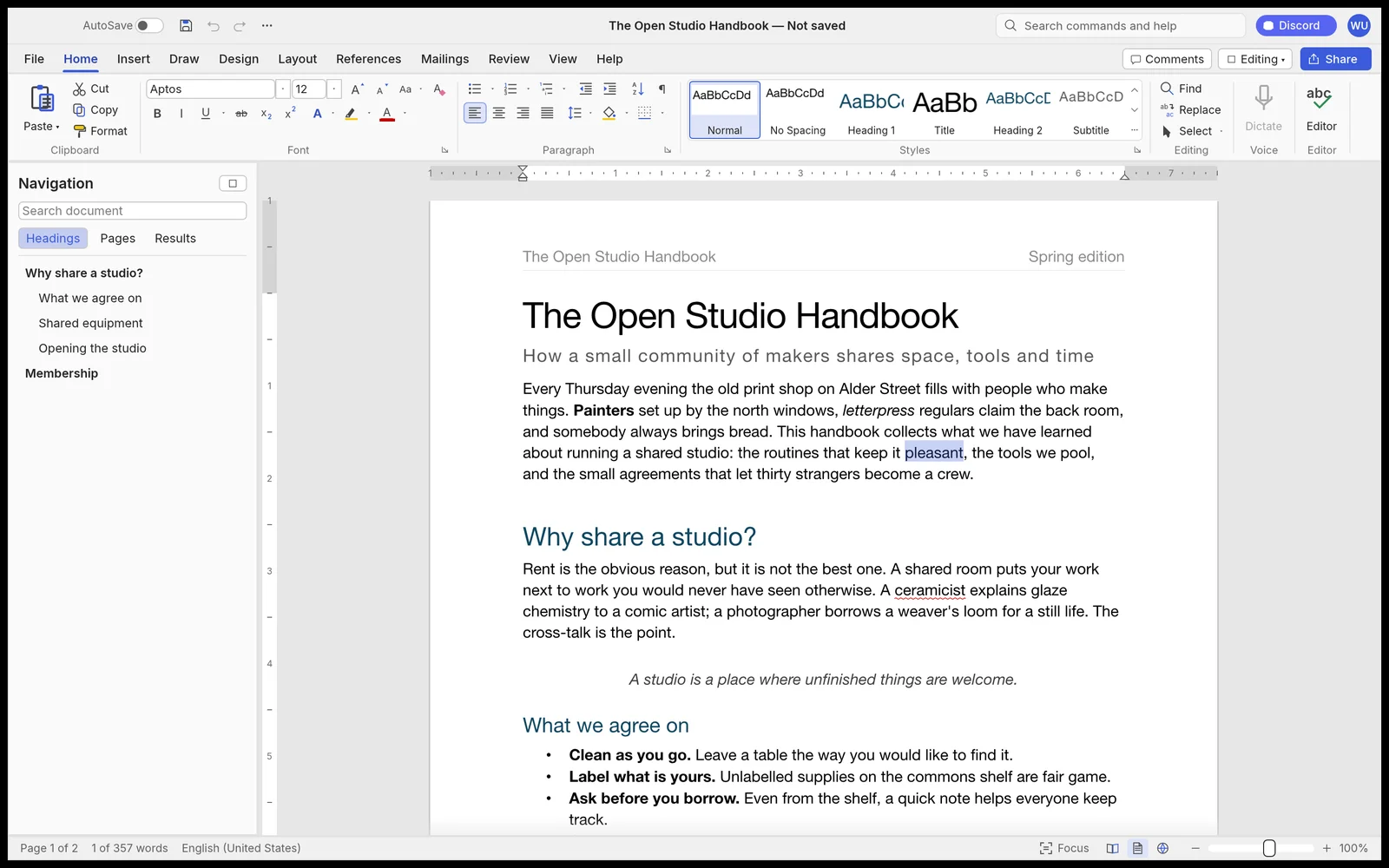
The ribbon, styles, tables, track changes, references and mail merge in a native word processor that reads and writes .docx. Open source, offline, and fast.
Key Features
Tabs, groups, shortcuts and the live Styles gallery. Enter continues a list, Tab demotes it, and formatting works as your hands expect.
Opens and saves .docx natively, imports and exports .odt, .rtf, .html, .md and .txt, and exports clean PDF with selectable text.
Paragraph layout is cached, so long documents keep typing responsive, with pages rendered on demand.
Comment balloons in the margin, accept and reject changes, document comparison, plus offline spelling and grammar as you type.
389 discrete commands drive the ribbon, keyboard shortcuts, a command-line tool, a JSON control channel and an MCP server.
Your Files Stay on Your Device
Zero File Uploads
Strict document privacy. Manuscripts and notes remain 100% client-side. All processing is computed in your browser using local device memory.
Saving & Exporting
Download your document in DOCX or PDF format with File → Export. Work buffers stay in browser localStorage and are exported directly to your computer.
Common Tasks & Solutions
Edit Word (.docx) Files Online Without Account
Open, edit, and format native Microsoft Word documents with full font, table, and paragraph style fidelity.
Distraction-Free Markdown & Document Writing
Instant, zero-latency typing with live style galleries, keyboard shortcuts, and clean typographical controls.
Track Changes & Margin Comments
Collaborate and review drafts with balloon comments in the margin, revision markers, and offline spellcheck.
Export Clean PDFs & Word Documents
Export your finished work to industry-standard .docx, formatted Markdown, HTML, or print-ready PDF.
Frequently Asked Questions
Can I open and edit Word (.docx) files without Microsoft 365?
Can I convert Markdown into Word or PDF documents?
Is my writing saved automatically?
Specifications
Companion Creative Applications
Part of the integrated Plasa creative suite. Easily round-trip your assets across these local-first tools:
PdfCraft
PDF editor & workflowThe open-source PDF workbench.

DeckCraft
Presentations & slidesFast, dynamic slide presentations, in pure Rust.
GridCraft
Spreadsheets & analysisFast, native spreadsheets, rebuilt in pure Rust.