
FilmCraftVideo editor in your browser
Video editorProfessional video editing, rebuilt from scratch in Rust.
About FilmCraft
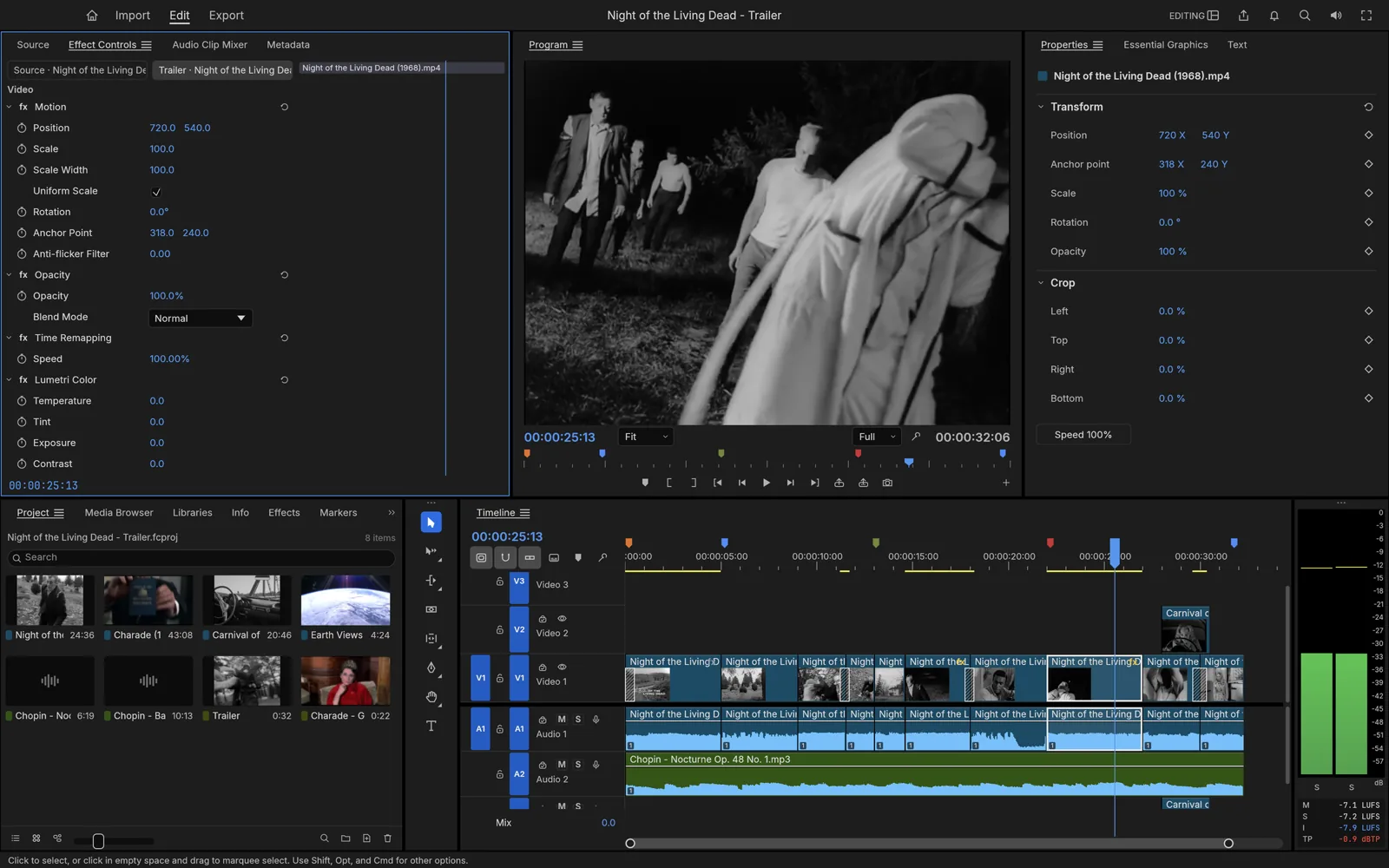
Source and program monitors, a real timeline and every trim mode, in a native editor written in pure Rust — down to its own codecs.
Key Features
Source and program monitors, three-point editing, every trim mode, and J/K/L dynamic trimming.
An integer timebase keeps 23.976 and 29.97 drop-frame exact. No drift, no rounding, no mystery frames.
No FFmpeg inside. Native H.264, HEVC, ProRes, VP9, AAC and Opus, with bit-exact decoders.
Curves, color wheels, HSL secondaries, LUTs, HDR and log workflows, plus scopes to check your work.
EBU R128 loudness meters, a mixer with automation, and native DSP effects.
Your Files Stay on Your Device
Zero File Uploads
Local browser media decoding only. Video clips remain strictly inside your browser sandbox. All processing is computed in your browser using local device memory.
Saving & Exporting
Export rendered video files to disk or save the project manifest (.fcraft). Work buffers stay in browser IndexedDB and are exported directly to your computer.
Common Tasks & Solutions
Trim & Cut Video Online Without Watermarks
Multi-track timeline for trimming clips, splitting scenes, and cutting video with zero export watermarks.
Fast Client-Side WebCodecs Rendering
Harnesses your local GPU and WebCodecs for hardware-accelerated video rendering without cloud upload wait times.
Audio & Video Multi-Track Sync
Layer music, voiceovers, sound effects, and video footage with frame-accurate precision.
Private Local Video Export
Keep family videos and client recordings private. All encoding happens on your machine and saves directly to disk.
Frequently Asked Questions
Is this video editor free with no watermark?
Do I have to upload gigabytes of video to the cloud?
Specifications
Companion Creative Applications
Part of the integrated Plasa creative suite. Easily round-trip your assets across these local-first tools:

EffectCraft
Motion graphics & VFXMotion graphics and visual effects, in pure Rust.

SoundCraft
Digital audio workstationProfessional audio recording and mixing, rebuilt in pure Rust.

PhotoCraft
Image editorThe image editor you already know how to use.